Techletter #48 | November 4, 2023
Why have I started writing commit messages in the present tense?
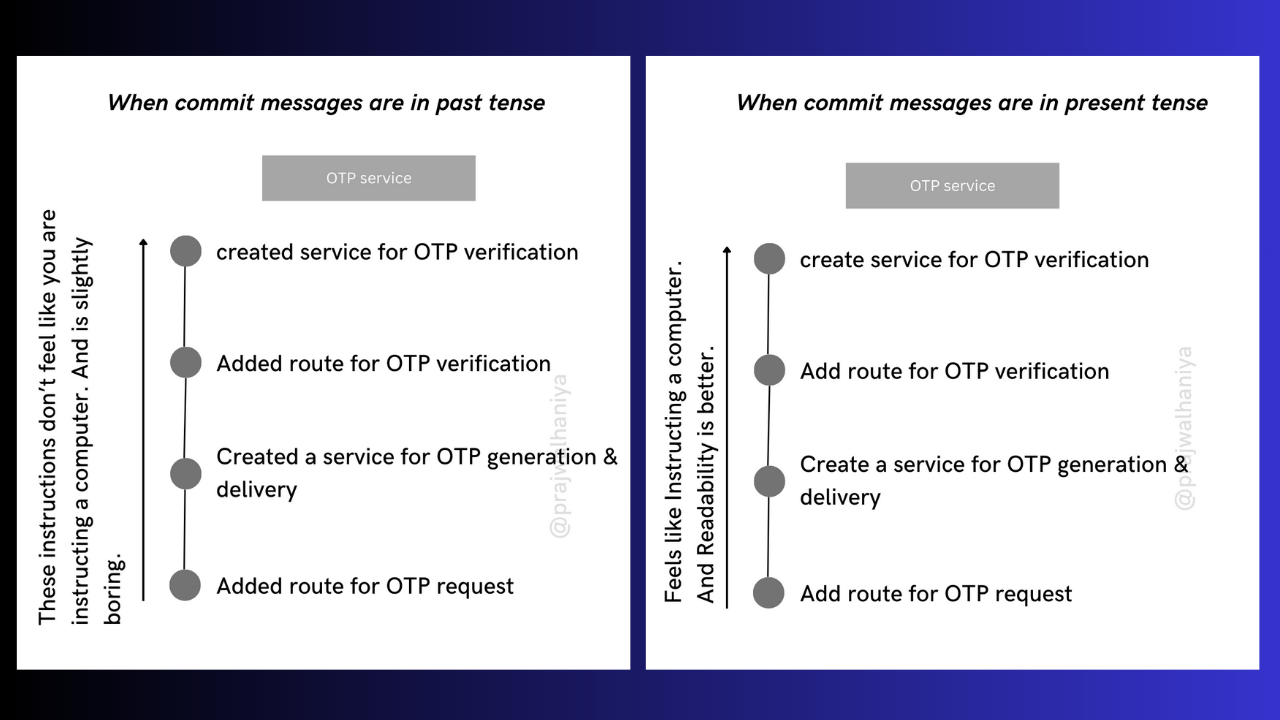
There is always a debate on how the commit messages should be. Should it be in present tense or past tense? People follow both approaches. But, I feel like you need to write commit messages in the present tense!
You may follow your team’s guidelines for it, or there may be no guidelines, and you commit with a message in whatever tense you like.
Don’t commit with messages like: “More changes, some changes, etc.” Because it won’t give any clarity on what changes you made until & and unless you have a lot of time to look at the code.
Why present tense?
Because it feels like you are instructing a computer. When you go back a few years and start reading all the commit messages from the beginning until now, you need to have clarity and your messages should be concise enough so that they can remind you of what you did and how much the product has grown.
This is definitely my personal choice, there are no restrictions on how your commit messages should be. But, the present tense would be great.
What is the difference between map & set in JS?
Map is a collection of key-value pairs. The keys & values can be any type of data. Maps are useful for storing data that needs to be accessed by a key.
const dictionary = new Map();
dictionary.set('hello', 'greeting');
dictionary.set('earth', 'the planet we live on');
dictionary.set('computer', 'an electronic device');

console.log(dictionary.get('hello')); // greeting
console.log(dictionary.get('computer')); // an electronic device
Map methods:
-
new Map(): creates the map. -
map.set(key, value): stores the value by the key. -
map.get(key): returns the value by the key,undefinedifkeydoesn’t exist in the map. -
map.has(key): returnstrueif thekeyexists,falseotherwise. -
map.delete(key): removes the element (the key/value pair) by the key. -
map.clear(): removes everything from the map. -
map.sizereturns the current element count.
Iteration over maps:
We can iterate over a map using for…of loop
// Get an iterable of the map's keys.
const keys = map.keys();

// Iterate over the map's keys.
for (const key of keys) {
  console.log(key);
}

// Get an iterable of the map's values.
const values = map.values();

// Iterate over the map's values.
for (const value of values) {
  console.log(value);
}

// Get an iterable of the map's entries.
const entries = map.entries();

// Iterate over the map's entries.
for (const [key, value] of entries) {
  console.log(key, value);
}
Set is a collection of unique values. The values can be any type of data. Sets are useful for storing data that needs to be unique.
const studentIds = new Set();
studentId.add('1234567890');
studentId.add('9876543210');
studentId.add('0123456789');

console.log(studentId.has('1234567890')); // true
console.log(studentId.has('9876543211')); // false
Set methods:
-
new Set([iterable]): creates the set, and if aniterableobject is provided (usually an array), copies values from it into the set. -
set.add(value): adds a value, and returns the set itself. -
set.delete(value): removes the value, returnstrueifvalueexisted at the moment of the call, otherwisefalse. -
set.has(value): returnstrueif the value exists in the set, otherwisefalse. -
set.clear(): removes everything from the set. -
set.size: is the elements count.
Iteration over sets
You can use either for…of loop or forEach to iterate over a set
let a = new Set();
a.add('item');

for(let key of a) console.log(key)

a.forEach(key => console.log(key))
Further reading:
How try & catch work in JS?
TLDR:
try...catchworks under the hood by creating and managing execution contexts to handle errors gracefully. It allows you to capture and handle errors that occur during the execution of JavaScript code, preventing them from crashing your application and providing a structured way to respond to unexpected situations.
The try/catch statement has two parts:
-
The try block: This is the block of code where you write your functionality + check for any errors. -
The catch block: This is the block of code that is executed if an error occurs in the try block. -
The finally block(Optional): After thetryandcatchblocks, you can optionally include afinallyblock. The code inside thefinallyblock always executes, regardless of whether an error occurred in thetryblock or not.
Now let’s understand it step by step:
In JavaScript, the code is executed in a context known as the execution context. This context includes information about the code being executed, such as variables, functions, and the call stack, which keeps track of function calls.
When the JavaScript engine encounters a try block, it creates a new execution context for that block. This context is pushed onto the call stack. The code within the try block is executed line by line.
If an error occurs in the try block, such as a runtime error or an exception, the JavaScript engine generates an error object. This error object includes information about the error type, message, and sometimes additional data specific to the error.
When an error is thrown, control is transferred out of the current execution context and up the call stack. The JavaScript engine looks for an associated catch block to handle the error.
If there is a matching catch block for the error type that was thrown, a new execution context for the catch block is created. The error object is assigned to the specified identifier (e.g., error) in the catch block, making it accessible for error handling. The code within the catch block is executed, allowing you to handle the error (that is whenever we console the error, it prints the error).
If a finally block is present after the catch block, a new execution context for the finally block is created. The finally block is executed regardless of whether an error occurred.
What is bloom filter?
Bloom filter is one of the interesting data structures that I have come across recently.
Why it’s important? For example, let’s assume that you have an application with a sign-up & login feature. Imagine your application has 1 billion (100 crores) users, so a user tries to sign up. How do you get to know whether the user already exists or not in your database? And going through each user’s email that is with O(n) time is not a feasible solution. And a user doesn’t wait until you check all 1 billion records (in the worst case). So, when you want to solve this kind of problem the bloom filter comes into the picture.
Why bloom filter when we already have hashmap?
Bloom filters practically perform better than hashmap, why would anyone use that data structure right? The hashmap has O(1) for retrieval but in the worst-case scenario it can be O(n). The time complexity of a Bloom filter is O(k), where k is the number of hash functions used. One more advantage is that you can get into collisions using hashmap. Some of the disadvantages of using a bloom filter are that it is slightly more complex to implement when compared to other data structures, and there are chances of false positives as well. Below are some of the interesting reads on bloom filters.
https://medium.com/@manningbooks/all-about-bloom-filters-2cd740172b50
https://medium.com/codex/how-to-efficiently-check-if-a-username-is-registered-dbbe02cca20f
https://iq.opengenus.org/comparison-of-bloom-filter/
https://dev.to/rudybeckerandarammartin/hashmaps-javascript-edition-44ic